UiKanbanSpecifier buildTodoKanban() {
    new UiKanbanSpecifier().ui {                                                                   (1)
        column 'HeaderStr', Style.ALIGN_CENTER, Gantt2Controller.&changeTodoProgression as MethodClosure, [newProgression: 0], {    (2)
            custom "Custom html code"                                                              (3)
            todos.forEach { Todo todo ->
                card todo, Gantt2Controller.&showTodo as MethodeClosure, todo.id, {                (4)
                    cardField todo.what_                                                           (5)
                    cardFieldRaw "Custom html code"                                                (6)
                    cardAction ActionIcon.SHOW * IconStyle.SCALE_DOWN, Gantt2Controller.&doSomething as MethodClosure, todo.id   (7)
                }
            }
        }
    }
}-
支持HTML
-
支持Mails
-
支持PDF
-
支持CSV
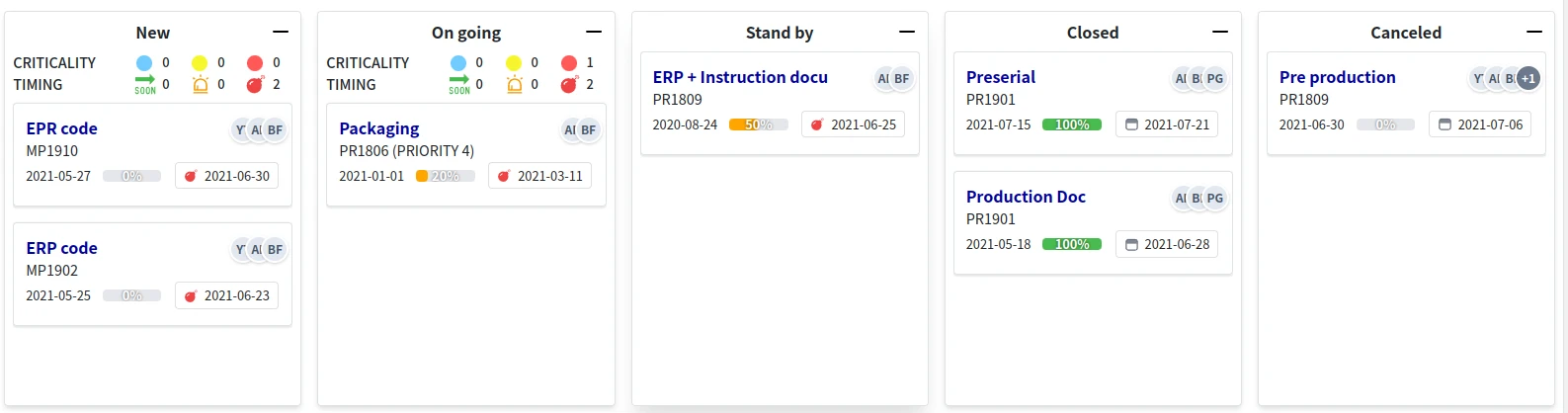
代码示例
看板代码示例1
写在一个service里面用来注册上下文菜单
@PostConstruct
void init() {
    TaackUiService.registerContextualMenuClosure(Todo, new UiMenuSpecifier().ui {               (8)
        menu 'Show Gantt', Gantt2Controller.&showGanttByTodo as MethodClosure, [id: this.params['id']]    (9)
    }
}| 1 | 创建看板 |
| 2 | 构建列和列标题,可以传递一个方法和参数作为列的拖拽放置事件 |
| 3 | 可以为列添加自定义HTML代码 |
| 4 | 在列中构建卡片,可以传递一个方法和参数,作为卡片的鼠标双击事件 |
| 5 | 在卡片中构建一个包含字段的行,注意字段名称末尾的下划线 |
| 6 | 可以添加自定义HTML代码 |
| 7 | 可以添加一个图标,并将其方法绑定到点击事件 |
| 8 | 注册鼠标右击事件 |
| 9 | 添加带有方法绑定的菜单项 |
DSL架构
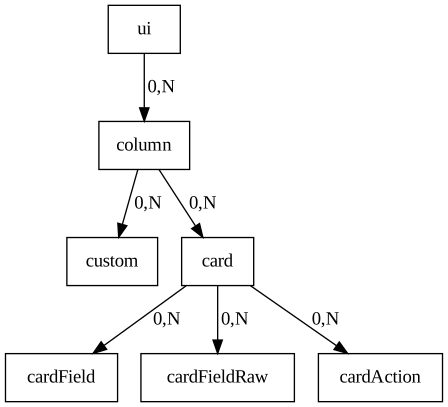
Figure 1. 看板DSL的架构图