UiKanbanSpecifier buildTodoKanban() {
    new UiKanbanSpecifier().ui {                                                                   (1)
        column 'To Do', Style.ALIGN_CENTER, {                                                      (2)
            custom "Custom header html code"
        }, Gantt2Controller.&changeTodoProgression as MethodClosure, [newProgression: 0], {
            custom "Custom html code"                                                              (3)
            todos.forEach { Todo todo ->
                card todo, Gantt2Controller.&showTodo as MethodClosure, todo.id, {                 (4)
                    cardField todo.what_                                                           (5)
                    cardFieldRaw "Custom html code"                                                (6)
                    cardAction ActionIcon.SHOW * IconStyle.SCALE_DOWN, Gantt2Controller.&doSomething as MethodClosure, todo.id   (7)
                }
            }
        }
    }
}Table of Contents
-
Rendered into HTML
-
Rendered into Mails
-
Rendered into PDF
-
Rendered into CSV
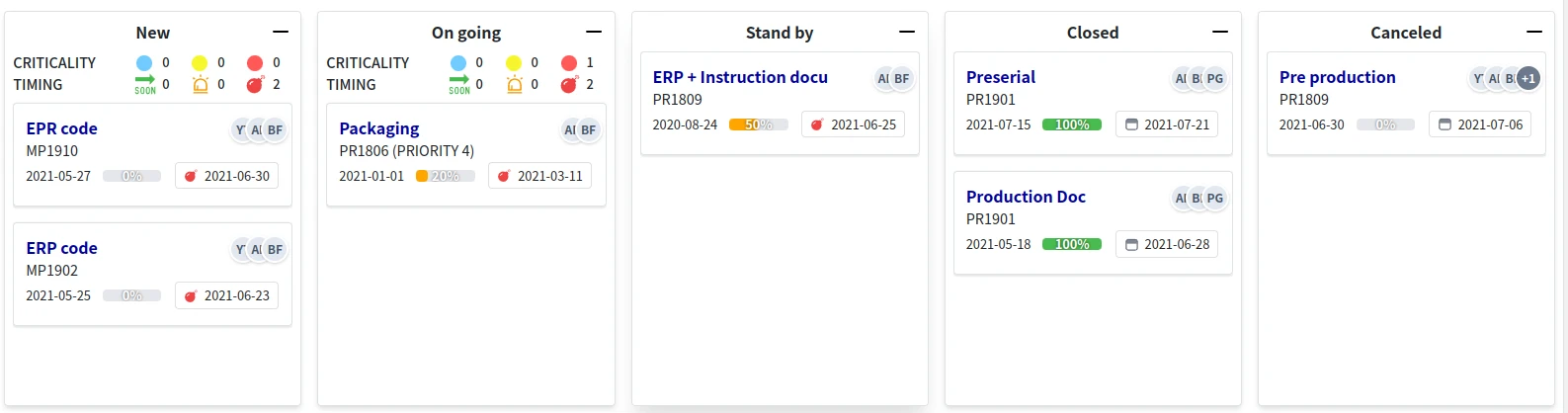
Code Sample
Kanban Sample Code 1
Drop action
@Transactional
def changeTodoProgression(Integer newProgression) {
    Todo todo = Todo.get(params.long('cardId'))                                                    (10)
    todo.progression = newProgression
    render status: 200
}
Write in a service for register contextmenu
@PostConstruct
void init() {
    TaackUiService.registerContextualMenuClosure(Todo, new UiMenuSpecifier().ui { Long id ->    (8)
        menu 'Show Gantt', Gantt2Controller.&showGanttByTodo as MethodClosure, id                 (9)
    })
}| 1 | Create the kanban specifier |
| 2 | Build kanban column with its label, style and an optional header closure (custom only), could pass an action and params called on Drag+Drop into the column |
| 3 | Could add custom html code for the column body |
| 4 | Build cards in the column, could pass an action and params as MouseDoubleClic for the card |
| 5 | Build a line with field in the card, note the underscore at the end of the field name |
| 6 | Custom HTML code, rendered as is. cardField with a String is sanitized (only basic formatting and links are kept); use cardFieldRaw for HTML built by the application, never for data typed by users |
| 7 | Could add an icon with action bind to clic |
| 8 | Register contextmenu as MouseRight for the card |
| 9 | Add a menu item with action bind |
| 10 | The dropped card id is transmitted via the cardId parameter, along with the column params |
To display the Kanban in a block, use kanban or kanbanFilter to associate a filter:
taackUiService.show(new UiBlockSpecifier().ui {
    kanbanFilter buildTodoFilter(), buildTodoKanban()
}, buildMenu())
DSL Symbols Hierarchy
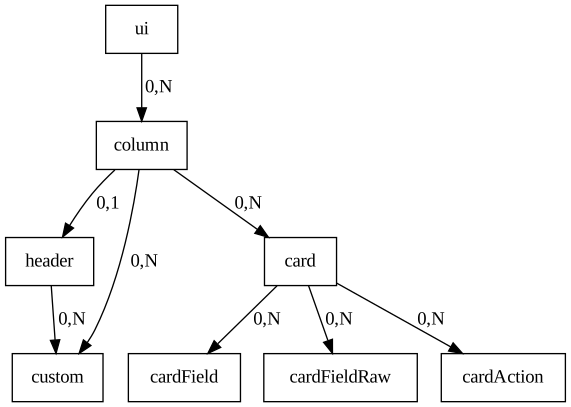
Figure 1. Symbols hierarchy diagram for Kanban DSL