private UiMenuSpecifier buildMenu(String q = null) {
    new UiMenuSpecifier().ui {                                  (1)
        menu CrewController.&index as MC                        (2)
        menu CrewController.&listRoles as MC
        menu CrewController.&hierarchy as MC
        menuIcon ActionIcon.CONFIG_USER, this.&editUser as MC   (3)
        menuIcon ActionIcon.EXPORT_PDF, this.&downloadBinPdf as MC
        menuSearch this.&search as MC, q                        (4)
        menuOptions SupportedLanguage.fromContext()             (5)
    }
}Table of Contents
-
Rendered into HTML
-
Rendered into Mails
-
Rendered into PDF
-
Rendered into CSV
Menu DSL associates menu entries with top level actions.
Menu DSL supports only 2 levels max (without taking into account section).
Entries are displayed only if the current user has access to the target action, labels are deduced from the action name if not given (use lang=test in the URL to see i18n keys).
| 1 | Create a new menu |
| 2 | Entries, labels are deduced from the action |
| 3 | Icon entries (hover message automatically deduced) |
| 4 | Search box |
| 5 | Options entries (here languages), other enums implementing IEnumOptions can be added |

Figure 1. Corresponding Menu Rendering
Sub-menus
new UiMenuSpecifier().ui {
    label 'Roles', {                                    (1)
        subMenu CrewController.&listRoles as MC
        subMenu CrewController.&hierarchy as MC
    }
    menuIcon 'Admin', ActionIcon.CONFIG, {              (2)
        section 'Users', {                              (3)
            subMenu CrewController.&editUser as MC
        }
    }
}| 1 | Labeled entry containing sub-menus |
| 2 | Icon entry containing sub-menus |
| 3 | section groups sub-menus under a title |
Contextual Menus
The same DSL is used to describe contextual menus (right click) on fields or classes:
TaackUiService.registerContextualMenuClosure(
    new Lead().leadStatus_,
    new UiMenuSpecifier().ui { Long id ->
        label 'Change Status'
        Lead.read(id)?.leadStatus?.transitionsTo()?.each {
            menu it.toString(), CrmController.&changeLeadStatus as MC,
                [id: id, leadStatus: it.toString()]
        }
    })
DSL Elements
-
menu: entry pointing to an action, optionally with a label, an id, a params map or aValidateableobject -
label: entry without action, or a group of sub-menus if a closure is given -
subMenu,subMenuIcon: entries inside alabelor amenuIconclosure -
section: group sub-menus under a title -
menuIcon: icon entry on the right part of the menu, can contain sub-menus -
menuSelect: select box, the selected value is transmitted to the current action -
menuSearch: search box -
menuOptions: options entries (languages, subsidiaries, …) -
inlineHtml: custom HTML code
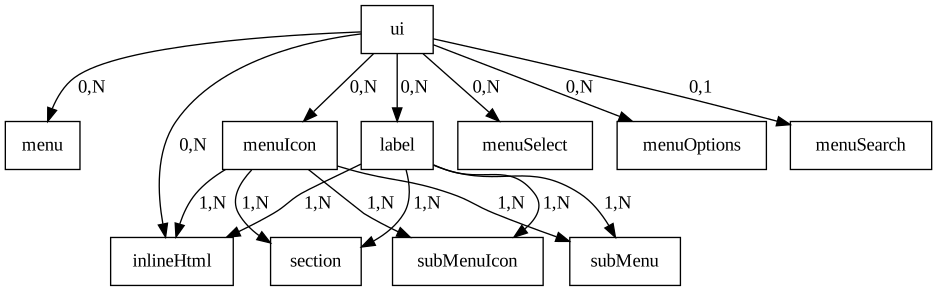
Figure 2. Symbol’s hierarchy diagram for Menu DSL