Version 0.7.6

  • Improve Custom Editor

  • Grails 7.2.0

Version 0.7.5

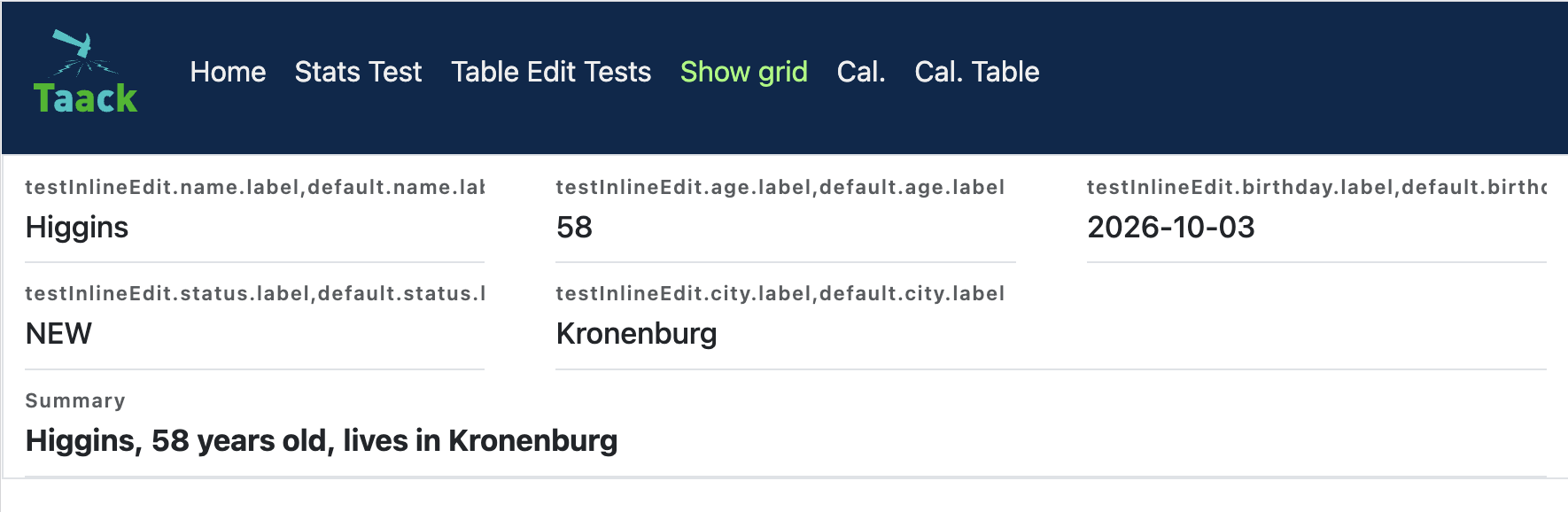
show grid layout

Example 1. Show Grid Layout
Lay a Show out on a responsive grid via ShowLayout.GRID
new UiShowSpecifier().ui ShowLayout.GRID, { (1)
    fieldLabeled item.ref_
    fieldLabeled item.name_
    fieldLabeled item.itemStatus_
    fieldLabeled item.gtin_
    fieldLabeled Style.SPAN_TWO, item.labeling_ (2)
    fieldLabeled Style.BOLD + Style.SPAN_FULL, item.description_ (3)
}
1 Pass ShowLayout.GRID to lay the fields out on an auto-fitting grid instead of vertically in a column. The default is ShowLayout.LIST.
2 Each field takes one grid cell by default. Style.SPAN_TWO / Style.SPAN_THREE can be be used to let grid cells to span more columns.
3 Style.SPAN_FULL makes a field span the whole row. Spans combine with any other style through + (here with Style.BOLD).

Note that the grid auto-fits as many columns as the container width allows, each at least 220px wide (grid-template-columns: repeat(auto-fit, minmax(220px, 1fr)) on the taackShowGrid class, the minimum can be overridden in your CSS).

Example 2. New Replace Modal Content
Replace any content of an upper modal
@Transactional
def doComplexStuff() {
    boolean isDone = false

    // doComplexStuff

    taackUiService.show(new UiBlockSpecifier().ui {
        replaceModal {
            custom("<h1> ${isDone ? 'Done.' : 'Not Done.'} </h1>")
        }
    })
}
Example 3. New Save Or close modal and refresh
Code
@Transactional
@Secured(['ROLE_ADMIN', 'ROLE_CONSOLATOR_ADMIN'])
def saveLlmRag() {
    taackSaveService.saveOrCloseModalAndRefresh(LlmRag)     (1)
}
1 If multiple modals are stacked, it is now possible to refresh the modal below the last one, which will be closed.

Version 0.7.4

  • Use Flying Saucer to produce PDF, avoiding iText AGPL issues

  • Improve diagram user interaction

  • Diagram DSL :

    • Add new diagram type timeline

    • Provide DiagramOption to customize chart

  • Table Sticky Columns

Example 4. Table Sticky Columns
Freeze leftmost columns via TableOption
TableOption tableOption = new TableOption.TableOptionBuilder()
        .stickyColumns(2).build() (1)

new UiTableSpecifier().ui tableOption, {
    header {
        sortableFieldHeader p.ref_
        sortableFieldHeader p.name_
        // ... any number of columns ...
    }
}
1 Number of leftmost columns to freeze. They stay visible while the table scrolls horizontally.

Note that Tables using sticky columns will not be width constrained and instead use the taack-sticky-table css class that limits the max-width of each column to 12rem.

Version 0.7.2

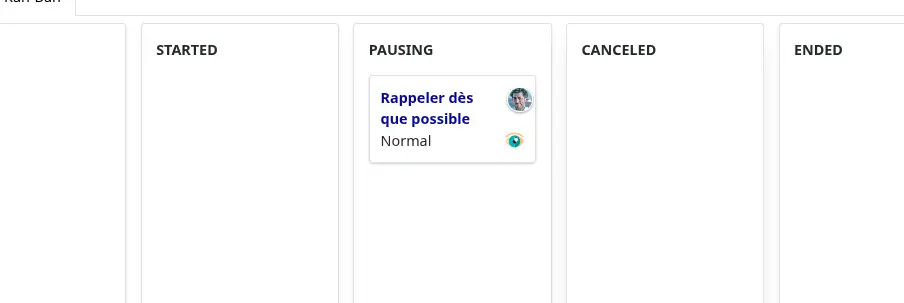
Example 5. Kan-ban with Drag & Drops
Kanban Specification Without Filter
new UiKanbanSpecifier().ui {
    ReminderStatus.values().each { ReminderStatus status ->             (1)
        column(this.&changeStatus as MC, [newStatus: status.name()]) {  (2)
            header status.name()                                        (3)
            reminders.grep { Reminder t -> t.status == status }
                     .sort { -it.lastUpdated.getTime() }
                     .each { Reminder rIt ->
                card(rIt.selfObject_) {                                 (4)
                    cardField rIt.title_, null, Style.BOLD + Style.BLUE
                    cardFieldRaw this.getReminderDoersHtml(rIt),
                        new Style('', 'position: absolute; right: 3px; top: 12px;')
                    cardAction ActionIcon.SHOW * IconStyle.SCALE_DOWN,
                        ReminderController.&showReminder as MethodClosure, rIt.id
                    cardField rIt.priority_
                }
            }
        }
    }
}
1 Iterate over columns
2 Define a Column
3 Header name of this column
4 Do the Card with cardField, cardFieldRaw and cardAction
screenshot kanban
Figure 1. Kan-Ban
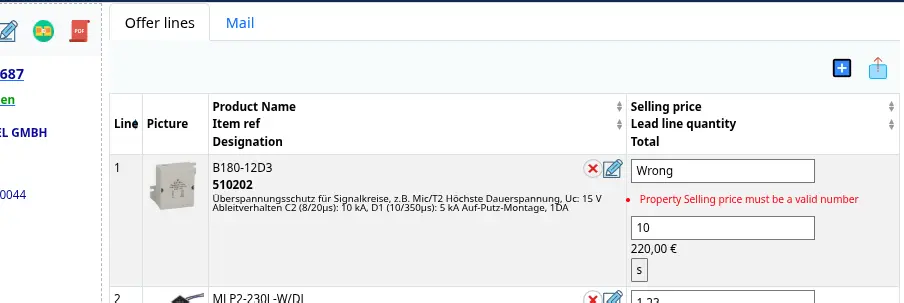
Example 6. Edit Objects in Table
Declare rowQuickEdit Block
rowQuickEdit(CrmController.&applyLeadLine as MC, ll.id) {           (1)
    rowColumn {
        rowFieldEdit ll.salePrice_                                  (2)
        rowFieldEdit ll.qty_                                        (2)
        rowField nf.format(tot), style                              (3)
    }
}
1 rowQuickEdit declares which action to call in case of inline editing
2 rowFieldEdit edit the value in an input field OR display the content if not allowed
3 Other field are recomputed among editions
applyLeadLine Definition
@Transactional
def applyLeadLine() {
    LeadLine ll = new LeadLine()
    taackSaveService.saveThenReloadOrRenderErrors
                    LeadLine, ll.qty_, ll.salePrice_            (1)
}
1 When saving, list field that can be updated only in the rowQuickEdit block
screenshot inline edit
Figure 2. Inline Edit with Localized Error Feedback
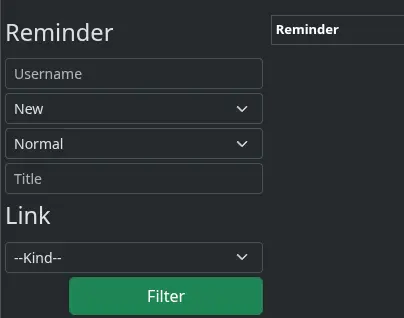
Example 7. New Filter Serialisation
Declare Filter
UiFilterSpecifier createReminderFilter(FieldInfo... leftField) {
    Reminder r = new Reminder()
    User u = new User()
    new UiFilterSpecifier(leftField).ui Reminder, {                 (1)
        section Reminder, {                                         (2)
            filterField r.assignee_, u.username_
            filterField r.status_
            filterField r.priority_
            filterField r.title_
        }
    }
}
1 leftField List fields that points to a reminder in the embedding object
2 New section with class argument to compute i18n automatically
Joining Filter
UiFilterSpecifier createReminderLinkFilter(FieldInfo... leftField) {
    ReminderLink rl = new ReminderLink()
    new UiFilterSpecifier(leftField).ui(ReminderLink, {
        section tr('reminderLink.label'), {
            filterField rl.kind_
        }
    }).join(createReminderFilter(rl.reminder_))                     (1)
}
1 Field reminder is a Reminder, we reuse the filter for Reminder class.
screenshot filter join
Figure 3. Joined Filters
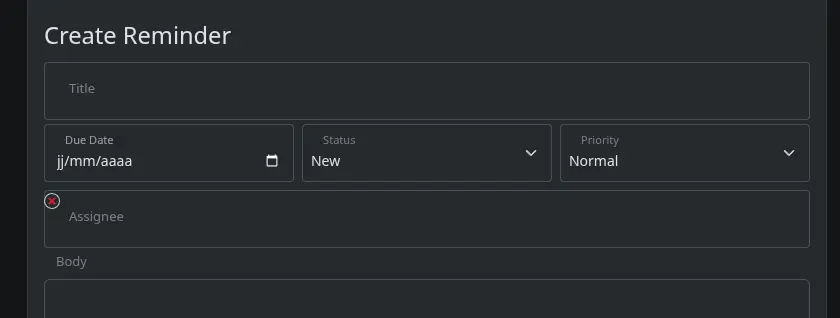
Example 8. New rowCol Layout Option
        taackUiService.show createModalForm(reminder, {
            section {
                field reminder.title_
                rowCols 3, {                                        (1)
                        field reminder.dueDate_
                        field reminder.status_
                        field reminder.priority_
                }
                ajaxField reminder.assignee_, CrewController.&selectUserM2O as MC
                field reminder.body_
            }
1 Avoid row, then col, col, col …​
screenshot form rowcol
Figure 4. rowCol in Form
Example 9. New poke Layout Refresh Block Instruction
taackUiService.show(new UiBlockSpecifier().ui {
    table statsService.buildTable()                                 (1)

    row {
        poke p1, {                                                  (2)
            col BlockSpec.Width.HALF, {
                diagram(statsService.&buildChart1 as MethodClosure)
            }
        }
        poke p2, {                                                  (2)
            col BlockSpec.Width.HALF, {
                diagram(statsService::buildChart2 as MethodClosure)
            }
        }
    }
}
1 When clicking on a table, we can refresh other blocks
2 poke p1 and p2 are booleans. If true, blocks inside poke block will be refreshed
Example 10. Accordion
accordion {
    accordionItem('Filter') {
        form CrmDashboardUiService.filterForm(filter)
    }
}
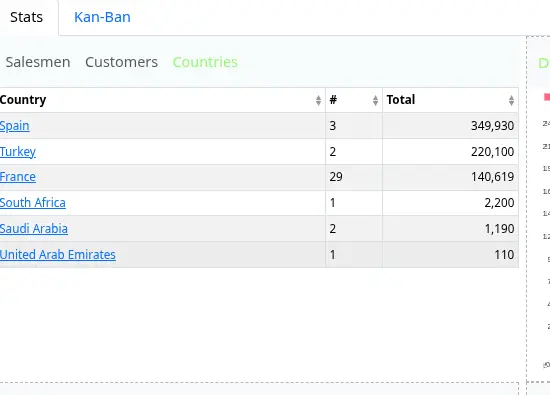
Example 11. scrollPanel
scrollPanel('512px') {
    UiTableSpecifier t
    boolean seeSalesmen = params.boolean('seeSalesmen')
    boolean seeTop = params.boolean('seeTop')
    if (seeTop) {
        t = crmDashboardUiService.topSalesmen(leads)
    } else if (seeSalesmen) {
        t = this.crmDashboardUiService.topCountries(leads)
    } else {
        t = crmDashboardUiService.topCustomer(leads)
    }
    table(t) {
        menu 'Salesmen', this.&group as MC, [seeTop: true, seeSalesmen: false]
        menu 'Customers', this.&group as MC, [seeTop: false, seeSalesmen: false]
        menu 'Countries', this.&group as MC, [seeTop: false, seeSalesmen: true]
    }
}
screenshot scrollpanel

Version 0.7.1

  • Fix i18n with bootRun task when enabling hot-reload

What’s new in 0.7.1

Version 0.7.0

  • Grails 7, Gradle 8.4, Java 24, Groovy 4.0.28 …​

  • Improve Performances, start transmitting page earlier and should consume less memory per page

  • Split taack-ui into taack-ui, taack-ui-jdbc, taack-ui-pdf, taack-ui-ssh, taack-ui-search, taack-ui-asciidoc. Minimal server using only taack-ui should be a Jar around 70 MB in size

  • Contextual Menus for fields and classes (See Contextual Menu Code Sample)

  • Notification helper: allow to mark unread rows on a table via setLastReadingDate filter setter. (See Create filter marking unread entries)

  • SolrSearch changes: objects context have to be registered in a generic manner (See Register how an object will be shown)

  • New Diagram customisation through builders, easing mail and pdf diagram integration (See Diagram Builder)

  • Asciidoc Editor with copy/past conversion capabilities (See Asciidoc Editor)

  • Improve Mail and PDF Diagrams outputs

  • TaackUiConfiguration is not initialized via application.yml, members are static and can be changed in server/grails-app/init/…​/Application.groovy (See TaackUiConfiguration)

  • It is now possible to be called back on drop event on a table or a table cell. (See Drop on Table, Drop on Cells, the row column is a droppable area)

Contextual Menu Code Sample
TaackUiService.registerContextualMenuClosure(                           (1)
    new Lead().leadStatus_,
    new UiMenuSpecifier().ui { Long id ->                               (2)
        label 'Change Status'
        Lead.read(id)?.leadStatus?.transitionsTo()?.each {
            menu it.toString(),                                         (3)
                CrmController.&changeLeadStatus as MC,
                [id: id, leadStatus: it.toString()]
    }
})
1 Register a contextual menu for a field
2 Use Regular MenuSpecifier closure (as for any menus)
news contextual menu on field
Figure 5. Result of a right click on Lead Status
Create filter marking unread entries
TaackFilter.FilterBuilder tf = taackFilterService.getBuilder(Item)
        .setMaxNumberOfLine(10)
        .setSortOrder(TaackFilter.Order.DESC, i.dateCreated_)

tf.setLastReadingDate(lastAccessDateFromUser)   (1)
news notif
Figure 6. Unread rows where object lastUpdated > lastAccessDateFromUser
Register how an object will be shown
TaackGormClassRegisterService.register(
        new TaackGormClass(ItemRange.class).builder
                .setShowMethod(Bp2Controller.&showRange as MethodClosure)   (1)
                .build(),
        new TaackGormClass(Item.class).builder
                .setShowMethod(Bp2Controller.&showItem as MethodClosure)    (1)
                .setShowLabel({ Long id ->                                  (2)
                    def i = Item.read(id)
                    return "${i.name} ${i.ref ?: ''} ($id)"
                })
                .setTypeLabel({ Long id ->                                  (3)
                    return TaackUiService.tr('default.item.label')
                }).build()
)
1 How to Show the Object
2 Custom Label
3 Type for Faceting
Diagram Builder
new UiDiagramSpecifier().ui {
    bar {
        labels 'xLabel1', 'xLabel2', 'xLabel3', 'xLabel4'
        dataset 'dataset1', 1.0, 2.0, 3.0, 4.0
        dataset 'dataset2', 6.0, 1.0, 2.0, 4.0

        option DiagramOption.builder
            .setClickAction(Rma2Controller.&editClaim as MethodClosure)
            // "diagramAction" was moved to here
            .showDataCount()
            // The numbers are hidden by default. Use this option if need to show
            .hideLegend()
            // The legends are shown by default. Use this option if need to hide
            .setResolution(DiagramOption.DiagramResolution.DEFAULT_4K)
            // Default resolution is [SVG: 960x480, PNG: 2160x1080].
            // Allow to set to 540p, 720p, 1080p, 2K, 1440p, 4K
            .setKeyColors(Color.RED, Color.BLUE)
            // Allow to self-define the colors for each dataset
            // (If not set, there are by default 7 colors)
            .setTitle("Test Chart") // Diagram title
            .build()
    }
}
Asciidoc Editor
//...
EditorOption.EditorOptionBuilder editor = EditorOption.getBuilder()
editor.addSpanRegexes(TaackBaseAsciidocSpans.spans)                 (1)
editor.addSpanRegexes(TaackAsciidocTable.spans)                     (1)
editor.addSpanRegexes(TaackAsciidocPlantUML.spans)                  (1)
editor.onDrop(this.&dropEditor as MC, cmsPage.id)                   (2)
fieldEditor cmsPage.bodyContent_, editor.build()                    (3)
innerFormAction this.&previewBody as MC                             (4)
//...

@Transactional
def dropEditor() {                                                  (2)
    CmsPage page = CmsPage.get(params.long('cmsPage'))
    params.remove('cmsPage')
    String past = params.get('onpaste')
    if (past) {                                                     (5)
        render taackAsciidocService.convertFromHtml(past)
    } else {                                                        (6)
        final List<MultipartFile> mfl = (request as MultipartHttpServletRequest).getFiles('filePath')
        final mf = mfl.first()

        if ([AttachmentContentType.SHEET_ODS.mimeType,
             AttachmentContentType.LO_TEXT.mimeType
            ].contains(mf.contentType)) {                           (7)
            render taackAsciidocService.convert(page, mf.inputStream)
        } else {                                                    (8)
            CmsImage cmsImage = taackSaveService.save(CmsImage)
            if (cmsImage && page) {
                cmsImage.cmsPage = page
            }
            render "image::${cmsImage.originalName}[]"
        }
    }
}
1 Add syntax spans extensions (basically a regex and a class to colorise the code)
2 Callback when a file is drop, or a past from another page or application is done
3 The field in the form
4 Optional Preview Action
5 Past a html content. Content will be converted into Asciidoc
6 Drop file part
7 The file is an ODS or Writer file, it will be converted into Asciidoc, image will be imported
8 The file is an image, it will be saved into the CMS.
taackAsciidocService uses TaackEditorService service from taack-ui-asciidoc, see form DSL
TaackUiConfiguration
@CompileStatic
class TaackUiConfiguration {
    static String defaultTitle = 'Taack'
    static String logoFileName = 'logo-taack-web.svg'
    static int logoWidth = 70
    static int logoHeight = 60

    static boolean fixedTop = false
    static boolean hasMenuLogin = true
    static boolean outlineContainer = false
    static String bgColor = '#05294c'
    static String fgColor = '#eeeeee'
    static String bodyBgColor = '#fff'

    static String home = System.getProperty('user.home')
    static String root = home + '/intranetFiles'
    static String taack = home + '/taack'
    static String resources = taack + '/resources'
    static String javaPath = '/usr/bin/java'
    static String plantUmlPath = home + '/plantuml-1.2022.7.jar'
    static String solrUrl = 'http://localhost:8983/solr/taack'
    static Boolean disableSecurity = false
}
Application.groovy
@CompileStatic
class Application extends GrailsAutoConfiguration {
    static void main(String[] args) {
        TaackUiConfiguration.disableSecurity = true
        TaackUiConfiguration.hasMenuLogin = false
        GrailsApp.run(Application, args)
    }
}
Drop on Table
        TableOption tableOption = new TableOption.TableOptionBuilder()
                .onDropAction(this.&testDrop as MC).build()             (1)

        new UiTableSpecifier().ui tableOption, {
            header {
                sortableFieldHeader cb.position_
                sortableFieldHeader cb.subsidiary_
                label 'Page OR Menu Entry'
            }
1 Action called in case of drop somewhere on the table.
Drop on Cells, the row column is a droppable area
cellDropAction(CmsController.&testCellDrop as MC)                       (1)
rowColumn {
    rowField cp.title_
    rowField 'test drop'
}
1 Action called in case of drop somewhere on the cell.

Version 0.6.1

Diagram Action Usage
new UiDiagramSpecifier().ui {
    bar {
        labels 'date1', 'date2', 'date3'
        dataset 'Stuff1', 3.0, 4.0, 5.0

        diagramAction this.&clickDiagram as MC, id, (1)
        [optionalParam: 'value']                    (2)
    }
}

def clickDiagram() {
    println(params)
    // [id: 123456, dataset: "Stuff1",
    // optionalParam: "value"                       (3)
    // x: "date1", y: "3.0"]
}
1 Diagram Action
2 Can pass map
3 Action params contain label, value, dataset name and map
Static Helpers Usage
import org.codehaus.groovy.runtime.MethodClosure as MC

import static taack.ui.TaackUi.createMenu           (1)

@Override
UiMenuSpecifier editorCreate() {
    createMenu {                                    (2)
        menu this.&createFromTemplate as MC
        menuIcon
            CollaboraIcons.WRITER,
            this.&createFromTemplate as MC,
            [collaboraApp: CollaboraApp.WRITER]
    }
}
1 Static Import
2 createMenu static call, shortcut for new UiMenuSpecifier().ui, other shortcuts include createModal, returning UiBlockSpecifier

Version 0.6

  • Load animation

  • Diagram zoom / scroll

  • Diagram tooltips

  • Table Multiselect (see doc/DSLs/filter-table-dsl.html)

  • Tabs lazy loading

  • Improve pagination

  • Optimize drawing, avoiding unnecessary draw

  • Avoid case where blocks were drawn twice

  • Improve search layout

  • Allow Big decimal on tables, shown in user’s locale

  • WiP: Simple Asciidoc WYSIWYG Editor

Version 0.5.7

  • Clean up show DSL code, deprecates passing object parameter to UiShowSpecifier().ui

  • Initial Asciidoctor WYSIWYG editor

    • Support for Drag and Drop images and files

  • More diagram DSLs

    • timeSeries

    • areaChart

    • bubbleChart

  • Security

    • Sanitize displayed information by default (use fieldRaw to avoid sanitizing)

    • Check access on all entry points

  • Bug fixes and dependencies bump

Replace field <html code> by fieldRaw <html code>

Version 0.5.6 (fix bugs from 0.5.5)

screenshot news sorting
Figure 7. Column headers show sorting directions
How to keep the context when clicking on a table
def showPart(PlmFreeCadPart part, Long partVersion, Boolean isHistory) {(1)
    taackUiService.show(
            plmFreeCadUiService.buildFreeCadPartBlockShow(
                    part, partVersion, false, isHistory),               (2)
            buildMenu(),
            "isHistory")                                                (3)
}
1 isHistory is an action parameter
2 isHistory is used when drawing the block; we need to retransmit it to draw the exact same block layout, by keeping the context
3 isHistory key is passed as the last taackUiService.show argument. You can put many keys to keep.

Version 0.5.4

Version 0.5.3

  • Fix form checkbox

  • Allow alias in TQL for formula columns

  • Code cleanup and increment dependency versions

Version 0.5.2

  • JDBC client is now also an AsciidoctorJ extension

  • Add getters to JDBC accessible domain fields

  • Add DSL TQL and TDL (Taack Display Language) for describing how to display queried data (either table or barchart)

  • Restore manual labeling on menus

  • More on diagram DSL (Thanks Chong and ZhenQing)

  • Better customisation

TQL and TDL (Taack Display Language)
select
    u.rawImg,
    u.username,
    u.manager.username
from User u
where u.dateCreated > '2024-01-01' and u.manager.username = 'admin';
--
table rawImg as "Pic", username as "Name", manager as "Manager"
news table
Figure 8. Results

Version 0.5.1

Replacement of TaackPlugin
@PostConstruct
void init() {
    TaackUiEnablerService.securityClosure(
        this.&securityClosure,
        CrewController.&editUser as MC,
        CrewController.&saveUser as MC)
    TaackAppRegisterService.register(
        new TaackApp(
            CrewController.&index as MC,                    (1)
            new String(
                this.class
                    .getResourceAsStream("/crew/crew.svg")  (2)
                    .readAllBytes()
            )
        )
    )
}
1 Entry Point
2 Icon
Replacement of Charts: Diagrams
private static UiDiagramSpecifier d1() {
    new UiDiagramSpecifier().ui {
        bar(["T1", "T2", "T3", "T4"] as List<String>, false, {
            dataset 'Truc1', [1.0, 2.0, 1.0, 4.0]
            dataset 'Truc2', [2.0, 0.1, 1.0, 0.0]
            dataset 'Truc3', [2.0, 0.1, 1.0, 1.0]
        }, DiagramTypeSpec.HeightWidthRadio.ONE)
    }
}
PDF containing diagrams
printableBody {
    diagram(d1(), BlockSpec.Width.HALF)
    diagram(d2(), BlockSpec.Width.HALF)
}
news diagram
Figure 9. Stacked Bar Diagram

Version 0.5.0

Based on Bootstrap

  • Themable

    • Color Scheme from your desktop

    • Adjustable component size

  • Easier to extend

Improved Loading Time

  • Less assets

  • CSS and JS shortened

Main Code Changes

New Layout DSL

  • Same layout for forms and blocks

    • col and row

    • tabs and tab

With for col only

DSL Menu for blocks

  • Menu DSL replace actions

  • No need to use icons

  • Menus are auto-translated

Simpler Code

Leads To :

  • Easier maintenance

  • Easier to contribute

Version 0.4.2

To be released…​ this version should come with some nice changes (breaking some old code sometime)

  • Improve DSL hierarchy

    • hidden fields on top only for readability

    • no redundant parameter passing in form

    • no redundant parameter passing in filter

    • filterField only under section only

    • form top level field only on header

  • hook for form fields to display M2M nicely

  • hook to register typical object filter

  • Improve restore state

  • Fix table grouping / trees with paginate

  • TBD

Version 0.4.1

screenshot news menu 0.4.1
Figure 10. Updated Menus layout
Menus layout code
private UiMenuSpecifier buildMenu(String q = null) {
    new UiMenuSpecifier().ui {
        menu CrewController.&index as MC
        menu CrewController.&listRoles as MC
        menu CrewController.&hierarchy as MC
        menuIcon ActionIcon.CONFIG_USER, this.&editUser as MC
        menuIcon ActionIcon.EXPORT_PDF, this.&downloadBinPdf as MC
        menuSearch this.&search as MethodClosure, q
        menuOptions(SupportedLanguage.fromContext())            (1)
    }
}
1 Language choice is on the right of the searchbar, and other enums can be added
Kotlin JS Debug HowTo
$ cd infra/browser/client                             (1)
$ ./gradlew browserDevelopmentRun                     (2)
$ vi intranet/server/grails-app/conf/application.yml  (3)
# Uncomment line bellow
# client.js.path: 'http://localhost:8080/client.js'

# Then your browser should show Kotlin code !
1 Move to client folder where JS code is generated
2 Launch a server serving client.js and client.js.map …​
3 edit your intranet application.yml file
New Solr DSL Simplification (no more labeling needed)
@PostConstruct
private void init() {
    taackSearchService.registerSolrSpecifier(this,
            new SolrSpecifier(User,
                CrewController.&showUserFromSearch as MethodClosure,
                this.&labeling as MethodClosure, { User u ->
        u ?= new User()
        indexField SolrFieldType.TXT_NO_ACCENT, u.username_
        indexField SolrFieldType.TXT_GENERAL, u.username_
        indexField SolrFieldType.TXT_NO_ACCENT, u.firstName_
        indexField SolrFieldType.TXT_NO_ACCENT, u.lastName_
        indexField SolrFieldType.POINT_STRING, "mainSubsidiary", true, u.subsidiary?.toString()
        indexField SolrFieldType.POINT_STRING, "businessUnit", true, u.businessUnit?.toString()
        indexField SolrFieldType.DATE, 0.5f, true, u.dateCreated_
        indexField SolrFieldType.POINT_STRING, "userCreated", 0.5f, true, u.userCreated?.username
    }))
}

Version 0.4.0

  • No more paginate in tables. See New iterate usage

  • No list, but an iterate taking a closure as parameter, with a builder pattern approach to pass args

  • Menu are auto labeled now (use lang=test in url to translate menus). See New menu code

  • No more isAjax parameter in tables …​ See New rowAction code

  • change rowLink into rowAction [i18n_isAjax]

  • No label needed on rowAction in tables. See New rowAction code

  • No more ajaxBlock required for tables, forms, tableFilters

  • formAction has no more isAjax parameter

  • formAction has no more mandatory i18n parameter

  • form has no more mandatory i18n parameter, i18n is based on current action name

  • block action has no more mandatory i18n parameter, i18n is based on target action

  • block action has no more mandatory isAjax parameter

New iterate usage
iterate(taackFilterService.getBuilder(Role)                     (1)
        .setMaxNumberOfLine(20)                                 (2)
        .setSortOrder(TaackFilter.Order.DESC, u.authority_)     (3)
        .build()) { Role r, Long counter ->
            row {
                rowColumn {
                    rowField r.authority
                    if (hasSelect)
                        rowAction
                            ActionIcon.SELECT * IconStyle.SCALE_DOWN,
                            CrewController.&selectRole as MC
                            r.id                                (4)
                }
            }
        }
1 iterate
2 Specifying max is enough to trigger paginate if more lines
3 Replace the old inefficient pattern to describe initial sort and order
4 No more i18n and isAjax parameter
New menu code
private UiMenuSpecifier buildMenu(String q = null) {
    UiMenuSpecifier m = new UiMenuSpecifier()
    m.ui {
        menu CrewController.&index as MC        (1)
        menu CrewController.&listRoles as MC
        menu CrewController.&hierarchy as MC
        menuSearch this.&search as MethodClosure, q
    }
    m
}
1 No i18n parameter
New rowAction code
if (hasActions) {
    rowColumn {
        rowAction ActionIcon.EDIT * IconStyle.SCALE_DOWN, this.&roleForm as MC, r.id (1)
    }
}
1 No i18n parameter, no last isAjax parameter

Version 0.3.9

No updates since too long, hibernation is coming to an end. This version offer:

  • Grails 6.2.0

  • Groovy 3.0.21

  • Bumping Various deps …​ (See Changelog)