
Table of Contents
Filter
-
Rendered into HTML
-
Rendered into PDF
-
Rendered into Mail
-
Rendered into CSV
Figure 1. Filter applied to a table, from Filter Sample Code 1
Filter DSL is always associated with a Table, a Diagram or a Kanban. A block cannot contain only a filter.
Code Sample
Filter Sample Code 1
UiFilterSpecifier f = new UiFilterSpecifier()           (1)

f.ui User, {                                            (2)
    section "User", {                                   (3)
        filterField u.username_                         (4)
        filterField u.lastName_
        filterField u.firstName_
        filterField u.manager_, u.manager.username_     (5)
        filterField u.subsidiary_
        filterField u.businessUnit_
        filterField u.enabled_
        filterFieldExpressionBool "My Team", true,      (6)
            new FilterExpression(cu.allManagedUsers*.id,
                    Operator.IN,
                    u.selfObject_)
    }
    section "Role", {
        UserRole ur = new UserRole(role: new Role())
        filterFieldInverse "Role", UserRole,            (7)
            ur.user_, ur.role_, ur.role.authority_
    }
}| 1 | Create the filter |
| 2 | pass the object class and the closure containing the specifications of the filter via the ui method |
| 3 | Create a section labeled "User" |
| 4 | Add field to the filter, note the underscore at the end of the field name |
| 5 | if the field is an object, pass an array with all steps necessary to target the field you want to filter on |
| 6 | filterFieldExpressionBool allows more complex filters, displayed as a checkbox; true is the default value |
| 7 | filterFieldInverse filters users pointed by a UserRole whose role authority matches |
Filter Sample 2
UiFilterSpecifier f = new UiFilterSpecifier()

CmsImage i = new CmsImage(cmsPage: new CmsPage())

f.ui CmsImage, cmsPage ? [id: cmsPage.id] : null, { (1)
    section "Image", {
        filterField i.hide_
        filterField i.filePath_
        filterField i.imageType_
    }
    section "Origin", {
        filterField i.cmsPage_, i.cmsPage.name_
        filterField i.cmsPage_, i.cmsPage.subsidiary_
        filterField i.cmsPage_, i.cmsPage.pageLayout_
        filterField i.cmsPage_, i.cmsPage.pageType_
    }
}
f| 1 | We can pass optional parameters to the action |
Reusing Filters
UiFilterSpecifier createReminderFilter(FieldInfo... leftField) {
    Reminder r = new Reminder()
    User u = new User()
    new UiFilterSpecifier(leftField).ui Reminder, {     (1)
        section Reminder, {                             (2)
            filterField r.assignee_, u.username_
            filterField r.status_
            filterField r.title_
        }
    }
}

UiFilterSpecifier createReminderLinkFilter(FieldInfo... leftField) {
    ReminderLink rl = new ReminderLink()
    new UiFilterSpecifier(leftField).ui(ReminderLink, {
        section 'Link', {
            filterField rl.kind_
        }
    }).join(createReminderFilter(rl.reminder_))         (3)
}| 1 | leftField lists the fields pointing to a Reminder from the embedding object |
| 2 | The section label is computed from the class (i18n) |
| 3 | The reminder field is a Reminder, we reuse the filter for the Reminder class |
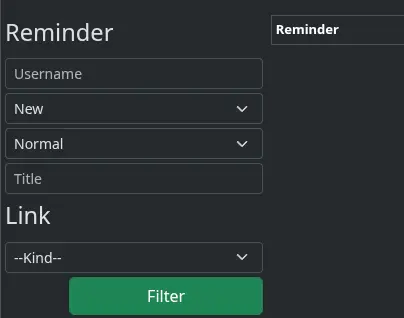
Figure 2. Joined Filters
Filter on objects pointing to the filtered ones
UiFilterSpecifier f = new UiFilterSpecifier().sec PlmFreeCadPart, {  (1)
    PlmFreeCadLink link = new PlmFreeCadLink()
    filterFieldExpressionReverse link.part_, true,                  (2)
        new FilterExpression(null as Object, Operator.NE, link.part_)
}| 1 | sec creates a filter without graphical part, always applied (for example for security purposes) |
| 2 | List only parts that are not referenced by a PlmFreeCadLink (true stands for NOT IN). It generates sc.id NOT IN (select l.part.id from PlmFreeCadLink l where l.part IS NOT NULL) |
DSL Symbols Hierarchy
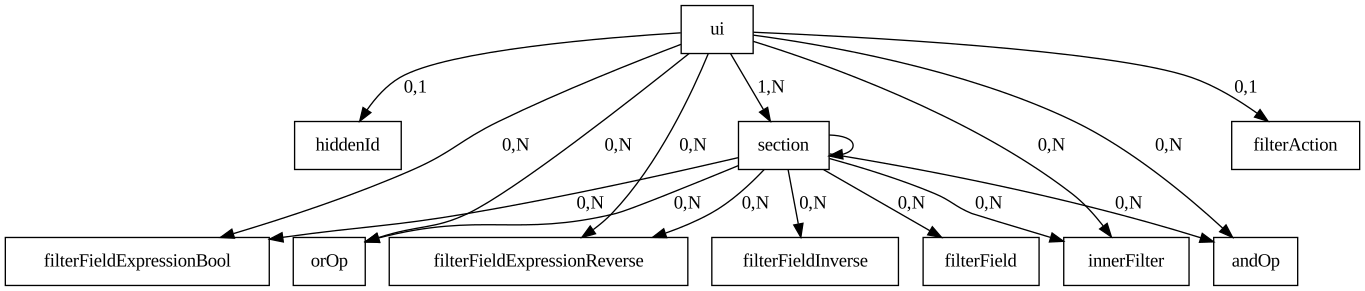
Figure 3. Symbols hierarchy diagram for Filter DSL
DSL Elements
Root
-
ui: one version allows passing additional parameters to the filter action (see Filter Sample 2) -
sec: filter without graphical part, applied in addition to the displayed filter -
join: add the filter of a related class (see Reusing Filters)
Inputs
-
filterField: add object field to be transmitted to the filter action -
filterFieldInverse: filter objects if another object points to it. -
filterFieldExpressionBool: allows changing where clause in the filter action by usingFilterExpression, displayed as a checkbox, the second parameter is the default value. -
filterFieldExpressionReverse:INorNOT INover an inner query (see Filter on objects pointing to the filtered ones) -
orOp,andOp: combine expressions -
innerFilter: reuse another filter on a field
Structure
-
section: add a graphical filter section, labeled by a string or a class, optionally collapsed -
filterAction: custom filter button
Table
-
Rendered into HTML
-
Rendered into PDF
-
Rendered into CSV

Code Sample
The right part of the preview corresponds to the DSL sample below. The filter is on the left of the image, see Filter Sample Code 1 for the corresponding code.
The table has pagination, it is sorted by default against Date Created column, all columns are sortable except Picture and Roles. One column can contain multiple cells. Only the users of the current user team are listed, since "My Team" is checked by default in the filter.
Table Sample: Header, Rows and a default sorting
new UiTableSpecifier().ui {
    User u = new User(manager: new User(), enabled: true)
    header {                                                (1)
        column {
            label tr('picture.header.label')                (2)
        }
        column {
            sortableFieldHeader u.username_                 (3)
            sortableFieldHeader u.dateCreated_
        }
        column {
            sortableFieldHeader u.subsidiary_
            sortableFieldHeader u.manager_, u.manager.username_
        }
        column {
            sortableFieldHeader u.lastName_
            sortableFieldHeader u.firstName_
        }
        label tr('default.roles.label')                     (4)
    }

    TaackFilter tf = taackFilterService.getBuilder(User)
            .setSortOrder(TaackFilter.Order.DESC, u.dateCreated_)
            .setMaxNumberOfLine(20).addFilter(f).build()

    iterate(tf) { User ru ->                                (5)
        rowFieldRaw attachmentUiService.preview(ru.mainPicture?.id)
        rowColumn {
            rowAction ActionIcon.SHOW * IconStyle.SCALE_DOWN,   (6)
                CrewController.&showUser as MC, ru.id
            rowAction ActionIcon.EDIT * IconStyle.SCALE_DOWN,
                CrewController.&editUser as MC, ru.id
            rowField ru.username_
            rowField ru.dateCreated_
        }
        rowColumn {
            rowField ru.subsidiary_
            rowField ru.manager?.username
        }
        rowColumn {
            rowField ru.lastName_
            rowField ru.firstName_
        }
        rowField ru.authorities*.authority.join(', ')
    }
}| 1 | Header part of the table specifications |
| 2 | Non-sortable field header |
| 3 | Sortable field header |
| 4 | It could be wrapped without column if only one field |
| 5 | iterate, specifying sort, paginate and filtering |
| 6 | Icons calling actions, displayed before the field values |
Multiple selection
header {
    columnSelect "selectedUsers", {                         (1)
        columnSelectButton "Disable", CrewController.&disableUsers as MC
    }
    // ...
}
iterate(tf) { User ru ->
    rowSelect ru.id.toString(), true                        (2)
    // ...
}| 1 | Multiple selection column, with the buttons calling actions on selected rows |
| 2 | Checkbox in the column corresponding to the columnSelect in header |
ActionIcon can be modified by IconStyle (e.g. ActionIcon.EDIT * IconStyle.SCALE_DOWN).
Table style is specified by Style, an optional parameter on row, rowColumn or rowField elements.
HTML Content: rowField and rowFieldRaw
rowField with a String is sanitized: only basic formatting tags and links are kept, anything else (<img>, <div>, scripts …) is removed. To insert HTML you built yourself, such as a picture preview, use rowFieldRaw, which writes the value as is.
iterate(tf) { User ru ->
    rowFieldRaw attachmentUiService.preview(ru.mainPicture?.id)  (1)
    rowField ru.authorities*.authority.join(', ')                (2)
}| 1 | HTML generated by the application, rendered as is |
| 2 | Plain text, sanitized |
Never pass data typed by users to rowFieldRaw: it is not escaped, so it would allow HTML or script injection.
|
Filter Layout
new UiBlockSpecifier().ui {
    tableFilter FilterLayout.TOOLBAR, buildFilter(), buildTable(), {  (1)
        menuIcon ActionIcon.ADD, this.&editUser as MC                 (2)
    }
}| 1 | FilterLayout.TOOLBAR displays the filter as a bar above the table, FilterLayout.SIDE in a column beside the table (default) |
| 2 | Menu displayed in the block header |
Table Options
TableOption tableOption = TableOption.builder
        .stickyColumns(2)                           (1)
        .onDropAction(this.&dropOnTable as MC)      (2)
        .headerTheme(Style.BLUE)                    (3)
        .build()

new UiTableSpecifier().ui tableOption, {
    // ...
}| 1 | Number of leftmost columns that stay visible while the table scrolls horizontally |
| 2 | Action called when files are dropped on the table (cellDropAction does the same on a cell) |
| 3 | Header color |
Inline Edition
iterate(tf) { LeadLine ll ->
    rowQuickEdit(CrmController.&applyLeadLine as MC, ll.id) {   (1)
        rowColumn {
            rowFieldEdit ll.salePrice_                          (2)
            rowFieldEdit ll.qty_
            rowField ll.total, nf                               (3)
        }
    }
}

@Transactional
def applyLeadLine() {
    LeadLine ll = new LeadLine()
    taackSaveService.saveThenReloadOrRenderErrors(LeadLine,
            [ll.qty_, ll.salePrice_] as FieldInfo[])            (4)
}| 1 | rowQuickEdit declares which action to call when a value is edited |
| 2 | rowFieldEdit edits the value in an input field, or displays it if the user cannot call the action |
| 3 | Other fields are recomputed after edition |
| 4 | Fields that are not editable in the table (lockedFields) |
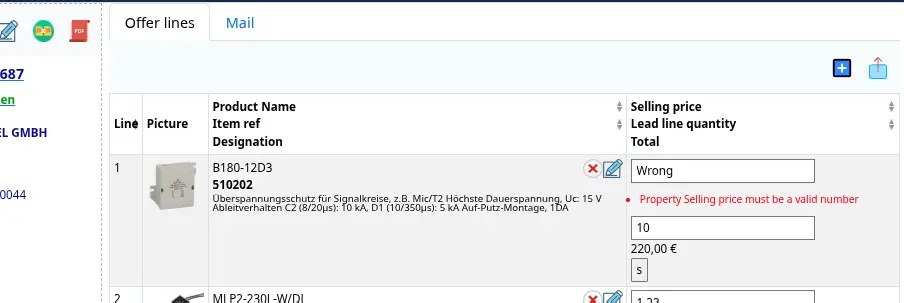
Figure 4. Inline Edit with Localized Error Feedback
DSL Symbols Hierarchy
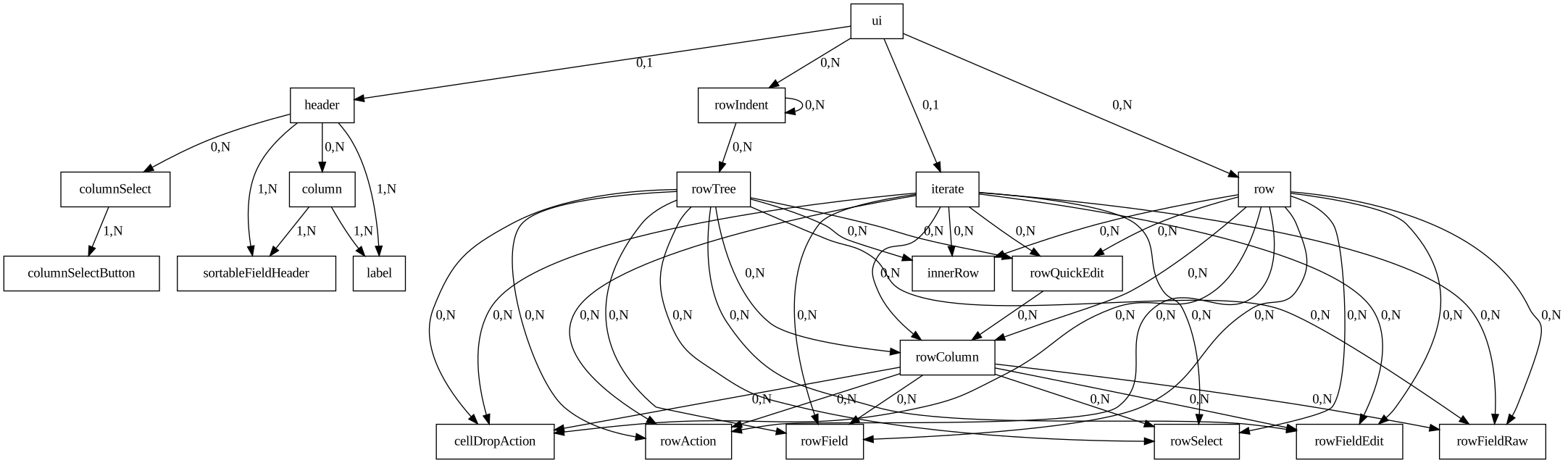
Figure 5. Symbol’s hierarchy diagram for Table DSL