def p = new UiPrintableSpecifier().ui {
    printableHeader "3.5cm", {                  (1)
        show new UiShowSpecifier().ui {
            fieldLabeled u.username_            (2)
        }, BlockSpec.Width.THIRD
        show new UiShowSpecifier().ui {
            field """
            <div style="text-align: center;">
                <img style="height: 2.5cm;"
                    src="data:image/png;base64,${png}"/>
            </div>
            """
        }, BlockSpec.Width.THIRD
        show new UiShowSpecifier().ui {
            field Style.ALIGN_RIGHT, 'Print Date',
                  new Date().toString()
        }, BlockSpec.Width.THIRD
    }
    printableBody {                             (3)
        def a = book.author
        show new UiShowSpecifier().ui {
            field Style.ALIGN_CENTER,
                  """<h1>${book.name}</h1>"""
            fieldUnlabeled Style.MARKDOWN_BODY,
                  book.abstractTextHtml_
        }, BlockSpec.Width.MAX
        show new UiShowSpecifier().ui {
                fieldLabeled book.isbn_
            section 'Author', {
                fieldLabeled book.author_, a.firstName_
                fieldLabeled book.author_, a.lastName_
            }
        }, BlockSpec.Width.HALF
        show new UiShowSpecifier().ui {
            section 'Stock', {
                fieldLabeled book.number_
                fieldLabeled book.stock_
            }
        }, BlockSpec.Width.HALF
        table bookstoreUiService.buildBorrowedBookTable(),
              BlockSpec.Width.MAX               (4)
    }
    printableFooter {                           (5)
    }
}Table of Contents
-
Renderizado en HTML
-
Renderizado en PDF
-
Renderizado en CSV
DSL para documentos imprimibles, encargado de organizar los elementos gráficos de la página en un documento estático (normalmente un PDF, aunque se pueden añadir otros formatos en el futuro).
Ejemplo de código de construcción de bloque imprimible
PDF básico
| 1 | printableHeader permite definir un encabezado que se repetirá en todas las páginas; el parámetro de altura es obligatorio si necesita una altura distinta de 2 cm. |
| 2 | Puede utilizar closures show habituales. |
| 3 | printableBody define el contenido del PDF a lo largo de varias páginas. |
| 4 | Puede utilizar closures table habituales; diagram también es compatible. |
| 5 | printableFooter permite definir el pie de página que se repetirá en todas las páginas; el tamaño no debe superar los 2 cm. |

Jerarquía de símbolos de Printable Block DSL
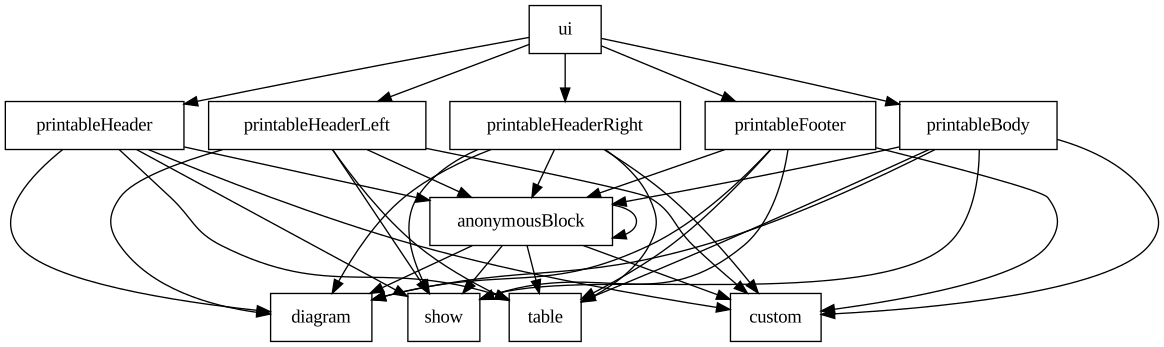
Figure 1. Diagrama de jerarquía de símbolos para Printable Block DSL